Monday, December 03, 2007

Simulasi Monte Carlo dengan PopTools sebuah Free Add-In Excel

Simulasi monte carlo akan dapat dilakukan dengan lebih mudah dengan bantuan komputerisasi. Beberapa hari lalu Pak Darsono, rekan dosen statistik dari Poltek Bengkalis, Riau meminta bantuan untuk dicarikan software yang mendukung simulasi tersebut.
Beberapa program sebenarnya cukup representatif seperti Crystal Ball maupun @Risk, namun tentunya saja harus mengeluarkan biaya cukup mahal. Sepengetahuanku pemakai di jogja hanya Fakultas Teknik UGM yang memakai Crystal Ball. So harus cari alternatif yang lebih terjangkau, ketemu dah sebuah free add-in Excel.
Suatu keputusan tertentu umumnya berisiko, hasilnya bisa menyimpang dari yang direncanakan atau yang diharapkan. Untuk itu diperlukan suatu simulasi dengan membangkitkan suatu bilangan acak, kemudian dianalisis secara statistik. Informasi sebaran nilai akan memberikan perkiraan probabilitas dan ini sangat dibutuhkan dalam analisa risiko. Simulasi Monte Carlo pada dasarnya adalah "What If Analysis" yang dilakukan beberapa kali sehingga akan didapatkan banyak nilai yang selanjutnya dapat dicari nilai rata-rata, standar deviasi, minimum, maksimum, dan grafik distribusi frekuensinya.
Dengan menggunakan PopTools langkah simulasi ini akan jauh lebih mudah.
Berikut langkah-langkahnya:


  1. Download PopTools dari situsnya
  2. Instal PopTools
  3. Aktifkan Excel Anda, jangan lupa security macro-nya dibuat medium dulu
  4. Pastikan tambahan menu PopTools telah aktif sebelum anda menggunakannya, jika belum masuk ke folder Program Files/PopTools, aktifkan filenya
  5. Untuk contoh-contoh penerapannya bisa anda lihat di menu Demonya (PopTools > Demo)


Read More..

Saturday, November 10, 2007

Menghapus Linked Account di MYOB?

Dari postinganku mengenai linked account muncul pertanyaan "Dapatkah kita menghapus linked account di MYOB?"
Sampai saat ini MYOB (versi 17) tidak menyediakan fasilitas untuk menghapus, kita hanya diperkenankan melakukan edit pada linked account, seperti yang sudah aku jelaskan di artikel linked account, kemudian setelah di-edit baru akun-akun yang standar yang telah dipindahkan linked-nya dapat dihapus, kecuali ada beberapa akun yang tidak dapat di-edit linked-nya seperti Retained Earning dan Current Year Earning. Kita hanya dapat mengedit no akun dan nama akunnya.

Read More..

Wednesday, September 26, 2007

Microsoft Excel for Perhitungan PPh Pasal 21 with Gross Up

Micrsoft Excel dapat digunakan untuk membantu melakukan perhitungan PPh Pasal 21 termasuk metode Gross up untuk tunjangan pajak karyawan. Perhitungannya pun cukup sederhana, dan dapat digunakan sebagai calculator PPh Pasal 21.
Sebelumnya pastikan setingan regional pada control panel di windows anda berada pada pilihan Indonesian.
Berikut langkah-langkah pembuatan sheet 'Calculator PPh Pasal 21':
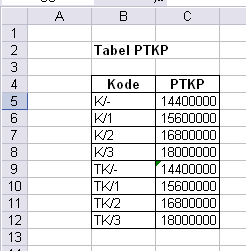
1. Siapkan sheet untuk tabel PTKP


Tabel PTKP untuk Perhitungan PPh Pasal 21

Beri nama tabel (seleksi sel B5:B12, kemudian Insert>Name>Define) dengan nama PTKP.
Asumsi nilai PTKP sesuai yang berlaku saat postingan ini saya buat.

2. Siapkan sheet untuk Perhitungan PPh Pasal 21

Kasus berikut misal Budi karyawan tetap dengan data sbb:
Perhitungan PPh Pasal 21

Contoh di atas untuk asumsi PKP s/d Rp. 25.000.000,-
Untuk yang PKP > 25juta silahkan memodifikasi sel C18 (PPh Pasal 21 Setahun) dengan fungsi logika bertingkat.

Untuk metode gross up, anda dapat memanfaatkan fasilitas Tools > Gool Seek.


Read More..

Friday, September 21, 2007

Quickbooks Tips and Tricks Are Recommended

This url address for Quickbooks Tips and Trick are Recommended:

www.quickbooksgroup.com/webx/qblibrary/Tips/
www.cpa911.com/qbtips.asp
www.quickbooksadvisor.info/sub/15_tips.htm
www.qbalance.com/QuickBooks_Tips_and_advice.htm
www.acctsite.com/quickbooks/qbtips.html
www.jonescpa.com/quickbooks_tips.htm
www.icavts.tec.ok.us/Quick Tips for QuickBooks.pdf
www.acctadv.com/quickbookstips.php
www.jonescpa.com/quickbooks_tips.htm
www.quickbooks-help.com/quickbooks-tips-and-tricks.asp


Wikipedia Definition of Quickbooks:
QuickBooks is an accounting software product developed by Intuit, Inc.


There are several different "flavors" of the software tailored to specific industries; however, the underlying program remains largely the same, the chief differences being industry customized pre-built reports, industry appropriate language (clients vs. customers, etc), and industry appropriate templates for invoices, P.O.'s, and estimates.

First launched in early 1992, QuickBooks quickly took hold as the market leader in small business accounting software. The software was popular amongst small business owners who had no formal accounting training. At the time, software packages were designed for use by accountants and cost $400 or more.

Today QuickBooks still has the largest market share of accounting products for small businesses in the United States. Small businesses use it to track expenses, prepare and send invoices, prepare financial statements, track inventory levels, and many other tasks. It is available in a range of versions, from those suitable to startup businesses up to larger businesses with up to 20 simultaneous users. It also comes in customized versions for different industries such as contracting, professional services, manufacturing, and wholesale. It is available as desktop software or a hosted online edition.

For most tasks, QuickBooks doesn't require its users to understand double-entry book-keeping or standard accounting procedures. Most transactions are recorded using on-line screens that closely resemble paper based forms such as invoices or checks. The system is readily adaptable to many different industries where there is no significant need for something industry specific.

Sage Software's Simply Accounting and Peachtree Accounting are competitors to QuickBooks. Microsoft's Small Business Accounting has also recently entered the market with limited success in its first year.

QuickBooks is also available as software as a service, which Intuit calls QuickBooks Online Edition. The user pays a monthly subscription fee rather than an upfront fee and accesses the software exclusively through secure logon via a web browser. QuickBooks Online requires an ActiveX control that operates only with the Windows operating system. Intuit hosts all of the user's data, and provides patches and regularly upgrades the software automatically.

On June 2007 Intuit announced that Quickbooks Enterprise Solutions would run on Linux servers, whereas previously it required a Windows server to run.

Tags: quickbooks, quickbooks tips, quickbooks tricks, quickbooks tips and tricks

Read More..

Tuesday, September 18, 2007

What's New (Latest Features) In MYOB 17

  • Receive items without a supplier's bill using the Receive Items feature

receiveitems

receive items feature

  • Synchronise your Accounting cards with Outlook
  • Combine duplicate or similar accounts into a single account record
  • Combine duplicate or similar cards into a single card record
  • If you want to undo your last bank reconciliation
  • Improvements in creating budgets
  • Additions and improvements to the Company Data Auditor
  • You can now save changes to a recurring transaction when you record it

All the latest features of MYOB Accounting:

Accounts:
Combine duplicate or similar accounts into a single account record
Improvements in creating budgets.
Banking:
If you want to undo your last bank reconciliation
Budgets:
Improvements in creating budgets
Cards:
Synchronise your Accounting cards with Outlook
Combine duplicate or similar cards into a single card record
Company Data Auditor:
Additions and improvements to the Company Data Auditor
New report: Deposit Transaction
New report: Tax Code Reconciliation Exception
You can now preview reports before printing them from the Company Data Auditor
Company File:
When you start a new financial year, keep or purge transactions
Importing and exporting:
Identify which records you want to import
Import and export inventory adjustments
Inventory:
Receive items without a supplier's bill using the Receive Items feature
Automatically enter the Last Purchase Price for an item or the Standard Cost of an item when entering purchases
The Item Information windows store additional information about your items
Import and export inventory adjustments
Jobs:
Allocation Memo field is displayed for more transactions on two job reports
Linked Accounts:
New report: Linked Accounts
OfficeLink:
A Credit Application Form is available for sending personalised letters
Preferences:
Automatically enter the Last Purchase Price for an item or the Standard Cost of an item when entering purchases
Purchases:
Receive items without a supplier's bill using the Receive Items feature
Automatically enter the Last Purchase Price for an item or the Standard Cost of an item when entering purchases
Automatically enter sales order or sales quote line items on a purchase order
New report: Deposit Transaction
New report: Payables with Tax
View only sales or only purchases in the Prepaid Transactions report
Combine duplicate or similar cards into a single card record
Reconciliation:
If you want to undo your last bank reconciliation
Recurring transactions
Create a copy of a recurring transaction for more than one card
You can now save changes to a recurring transaction when you record it
Record pre-dated transactions when you create a recurring transaction
Search the Recurring Transactions List by transaction name, transaction amount or due date
Reports:
New report: Deposit Transaction
New report: Linked Accounts
New report: Payables with Tax
New report: Receivables with Tax
New report: Tax Code Reconciliation Exception
Select the default code used in the Tax Code Exceptions [Invoice Transactions] report
View only sales or only purchases in the Prepaid Transactions report
Allocation Memo field is displayed for more transactions on two job reports
Sales:
Identify which records you want to import
Automatically enter sales order or sales quote line items on a purchase order
View only sales or only purchases in the Prepaid Transactions report
Select a posting date for To Do List transactions
New report: Deposit Transaction
New report: Receivables with Tax
Start a New Financial Year:
When you start a new financial year, keep or purge transactions
To Do Lists:
Select a posting date for To Do List transactions

Read More..

Monday, September 17, 2007

Peachtree Accounting: Cara Praktis dan Lengkap

Bagi yang sedang mencari referensi buku Peachtree Accounting terbaru anda bisa pilih alternatif buku berikut:
"Cara Praktis dan Lengkap Peachtree Accounting", karangan Wiratna Sujarweni.
Buku ini cukup mudah dipahami dan langsung dapat dipraktikan karena disertai kasus-kasus baik perusahaan jasa, dagang maupun manufaktur. Pembaca akan dituntun secara rinci untuk menghasilan laporan keuangan di berbagai jenis perusahaan tersebut.
Kebetulan saya juga ikut memberikan masukan dalam pembuatan buku ini.


Buku ini cukup menjadi pelepas dahaga peminat Peachtree Accounting, karena sangat jarang buku-buku serupa yang berbahasa Indonesia.
Walaupun cukup lengkap buku ini harganya cukup terjangkau, hanya Rp. 34.000
So .. jangan sampai ketinggalan.

note: bagi yang kesulitan mendapatkan buku ini dapat pesan melalui saya via e-mail.
(butzajogja[at]yahoo.com)

Read More..

Friday, September 14, 2007

WANTED! Indonesian free accounting software : Cari Software Akuntansi Murah Berbahasa Indonesia, Kalau Bisa Gratis :) Tapi Berkualitas

Cari Software Akuntansi Murah Berbahasa Indonesia, Kalau Bisa Gratis :) Tapi Berkualitas! Ada nggak ya?
Judul saya tadi mungkin mewakili para pencari software akuntansi di Indonesia atau paling tidak saya sendiri. Murah dalam asumsi saya dibawah Rp. 100.000. Berkualitas artinya feature-nya cukup lengkap tidak hanya 'general ledger', tapi mencakup purchase, ,sales, payment hingga export data ke excel.


Saya coba ubek-ubek di Internet dengan google dan yahoo. Susah juga ternyata. Kalau yang berbahasa Inggris sih banyak, gimana yang berbahasa Indonesia?
Ada yang bisa membantu?


tags: free accounting software

Related Post:
Choose Your Real Free Accounting Software


Read More..

Tuesday, September 11, 2007

Exercise (tutorial) MYOB Accounting: Receive Money, Spend Money

Let's assume you want to record the deposit of $10,000 cash in the business bank account to fund the initial activities of the company.

  • Go to the Banking command centre and click Receive Money window appears.
  • Click the Deposit to Account radio button. Cheque Account appears automatically in the adjacent field.
  • Type date (x/x/xx) in the Date field and pres Tab.
  • The Payor field is where you can record the writer of the cheque. However, leave it blank in this example.
  • Tab to the Amount Received field and enter $10,000 (simply enter 10000 and the amount will be formatte correctly).
  • Tab to the Payment Method field and type Cash.
  • Tab to the Memo field and type Initial funding of the company
  • Tab to the Account Name column. Here you specify an account that can explain the increase in the bank account selected at the top of the window. In accounting terms, you are increasing equity or your share of the business; therefore, the appropriate account to use would be the capital account.
  • Click the seach icon. The select from list window appears.
  • Double-click the equity account.
  • Tab to the Amount column. the ammount of $10,000 appears automatically.
  • Click Recod. The entry is saved and the windows cleared.
  • Click Cancel to return to the Banking command centre.


Congratulations! You have just completed the first entry in this tutorial.

Related Posts:


Read More..

Spending and Receive Money In MYOB Accounting

It's simple to track money you spend and receive in your MYOB Accounting software. The Spend Money and Receive Money functions can be found in the Banking command centre. You can use the Spend Money window to record payments for purchase or expenses you won't be entering purchase orders for (using the Purchase command centre), such as postage, rent and owner drawings.


You can use the Receive Money window to record interest or record the miscellaneous cash receipts you receive. To ensure you have accurately entered your transactions, you can reconcile MYOB's accounts with your bank statement using the Recouncile Accounts function also found in the Banking command centre.

Related Posts:


Read More..

Friday, September 07, 2007

Accounting Best Practices: Book Reviews

Book Description:
Praise for Accounting Best Practices, Fifth Edition


"For a comprehensive, yet easy-to-read guide to fixing those all-too-common shortcomings in your accounting department, look no further than this excellent book. Steve Bragg provides hundreds of fixes, many of them requiring surprisingly little time or cost while providing a handy guide to common implementation pitfalls . . . I would recommend this invaluable book to anyone who is looking to enhance their existing processes, whether due to growth in their business, compliance with Sarbanes-Oxley, or just as part of their ongoing improvement process."
—Martyn Webster, CPA, Director of FinanceXenoPort, Inc.

"This book is critical to running an efficient and accurate accounting department. The use of RFID technology to track documents is one of many valuable tools in this latest edition. A required read for the demanding accounting manager's role."
—Jason Charet, CPA


"I've used Steve Bragg's Accounting Best Practices books for years as a source of ideas for improvement. Like the previous editions, the Fifth Edition has a number of new, actionable best practices as well as refinements of those ideas reported in previous editions. The books are broad enough in their perspective so that nearly any organization could find ideas that could pay back the cost of the book many times over."
—John Temmerman, Controller Evangelical Lutheran Church in America

"What a great resource! I have been in the accounting field for over twenty years, and I was still able to gain insight into improving processes within my office. Thanks for putting it all in one book!"
—Tina M. Thomas, CPA, CTP, Controller Goodman & Company, LLP

Book Info
Provides the most advanced techniques and strategies available today to help your business cut costs and improve accounting operations-regardless of your company's size or holdings. DLC: Accounting. --This text refers to an out of print or unavailable edition of this title.

Accounting Books
Praise for Accounting Best Practices
Price: $75.00
Buy


Read More..

Easy-to-use Bookkeeping Software for Small Businesses with Microsoft Excel

When it comes to choosing accounting software, this aspect is often overlooked, but it's one that's extremely important to take into account. No matter how great the software or how inexpensive, if it’s too cumbersome or hard to learn, you won’t use it. So don’t go overboard by purchasing a package that offers extra things your company doesn’t really need. Keep it simple, stay focused on your business's needs, and look for those programs that have easy interfaces.


Excel Accounting
Big E-Z Monthly Bookkeeping for Microsoft Excel

Product Features:
  • Easy-to-use bookkeeping software for small businesses
  • Tracks and categorizes monthly income and expenses
  • Reconciles checkbook; determines profits; ideal for non-bookkeepers
  • Customizable Excel spreadsheet templates with built-in formulas
  • Printable forms and instruction manual (PDF) with helpful tips

Price: $29.95
Buy

Read More..

Friday, August 31, 2007

MYOB Indonesia

MYOB Accounting berbahasa Indonesia? Itulah yang banyak ditanyakan ke saya. Pertanyaan itu wajar semakin banyaknya orang di Indonesia memakai aplikasi ini. Memang sampai saat tulisan ini saya tulis MYOB belum (tidak?) mengeluarkan versi yang berbahasa Indonesia. Saat ini MYOB sudah sampai MYOB versi 17 dan yang Premier 11 tetapi belum ada tanda-tanda untuk berbahasa Indonesia, yang ada adalah MYOB versi Asia dengan pilihan regional International untuk Indonesia tetapi tetap berbahasa Inggris.


"All MYOB software is backed with comprehensive services and support to ensure you get maximum value for your business"

Tapi saya pikir ini juga tidak perlu toh kalo sudah biasa nggak akan ada masalah karena tampilan MYOB juga cukup sederhana.

Related post:
Langkah MYOB untuk Pemula
Belajar MYOB (bagian 2)


Read More..

Thursday, August 30, 2007

Peachtree Complete Accounting 2008: Right Choice for Your Business

This new comer from Sage:
Peachtree by Sage Complete Accounting 2008 combines robust core accounting with advanced features like job costing, time and billing, in-depth inventory capabilities and analysis tools. Its multi-user option improves productivity while providing control over who accesses data. Peachtree Complete Accounting 2008 provides 125+ customizable business reports and financial statements.
For multi-user access, you must purchase one single-user box per named user or one Multi-use Value Pack for up to five named users. See System Requirements. For greater than 5 named users

What's new in Peachtree Accounting 2008:


1. Reporting Improvements
2. Forms Design Improvements
3. Decimal Settings
4. Add Attachments
5. Permanently Hide Navigation Centers
6. Improved Save Records and Transaction Performance


Product Features:

Peachtree Complete Accounting 2008 is ideal for small business people who want accuracy, control and better business results!
* Easy Startup, Easy to Learn

Standard Accounting

* General Ledger
* Accounts Receivable
* Accounts Payable
* Inventory
* Payroll Solutions
* Time & Billing and Job Costing
* Fixed Assets
* Analysis and Reporting
* Time Savers and Customization
* Peachtree Complete Accounting 2008 Main Page

System Requirements:
Customer registration and acceptance of the license agreement for Peachtree Software is required.
Microsoft® Windows® 2000 SP3, XP SP2 or Vista.
At least 1 GHz Intel Pentium III (or equivalent) for single user and 1.8 GHz Intel Pentium 4 (or equivalent) for multiple users.
256 MB RAM minimum, 512 MB or higher recommended; Windows Vista requires 512 MB of RAM (single or multi user.
1 GB available hard disk space.


visit: peachtree.com

Read More..

Tuesday, August 28, 2007

Linked Account: Pengaturannya di MYOB (belajar MYOB bag. 3)

Linked Account di MYOB Accounting diibaratkan sebagai jalur sistem penghubung antara form pengisian data dengan posting ke jurnal. Jadi jika linked account tidak sesuai yang kita inginkan tentu saja hasil jurnalnya juga demikian.
Ada 3 Linked Account di MYOB Accounting, yaitu Sales Account, Purchase Account, & Account & Banking Account, sedangkan di MYOB Accounting Plus dan MYOB Premier terdapat 1 tambahan linked lagi yaitu Payroll.

Berikut contoh pengaturan Linked Account:
SETUP > Linked Account :

linked account

1. Sales Account:

Read More..

Peachtree Accounting, Belajar Alternatif Program Komputer Akuntansi

Kita sudah sering mengenal Program-program akuntansi seperti DEA, MYOB, Quickbooks dll. Kali ini kita akan mengenal program Peachtree Accounting. Peachtree Accouting merupakan software akuntansi yang dikembangkan di Amerika. Program ini lumayan komplit feature dibanding pesaing-pesaing di kelasnya. Sekilas tidak mudah untuk memahami pemakaiannya, seperti halnya MYOB. Namun begitu saya sudah mencoba ternyata hanya butuh sedikit pembiasaan.

Beberapa tips yang mungkin bermanfaat:


1. Saat instalasi program pastikan alamat penyimpanan program, karena tidak disediakan pada saat membuat data baru.
2. Pilih tipe Build your own untuk membuat daftar akun berbahasa Indonesia
3. Buatlah daftar akun terlebih dahulu kemudian atur default-default program
4. Gunakan Peachtree versi 2003 atau diatasnya, karena versi sebelumnya beluam ada fasilitas credit memo secara khusus.

Related Post:
Peachtree Accounting: Cara Praktis dan Lengkap

Read More..

Excel Accounting alias Excel Akuntansi

Excel Accounting / Excel Akuntansi adalah implementasi sistem akuntansi yang dijalankan dengan program Microsoft Excel. Dengan lengkapnya fungsi dan didukung penggunaan makro menjadikan Excel dapat dijadikan alternatif untuk sistem akuntansi berbasis komputer.

"Using Excel, we will enjoy greater efficiency in doing accounting problems."

Jika anda ingin mencobanya saya sarankan untuk mempelajari Excel secara mendalam sampai makro-nya kemudian juga harus didukung pemahaman atas siklus akuntansi. Dengan demikian kombinasi keduanya akan dapat menghasilkan suatu sistem akuntansi yang biasa disebut Excel Accounting atau Excel Akuntansi.


Selamat mencoba!!

Read More..

Thursday, August 23, 2007

MYOB Accounting Guide: Setting It Up Properly MYOB Premier Accounting & MYOB AccountEdge

MYOB Accounting Books

Setting It Up Properly MYOB Premier Accounting 2005 & MYOB AccountEdge 2005 This course material is aimed at existing and prospective business owners and/or bookkeepers, and focuses on proper configuration of MYOB accounting software to meet the needs of Management. Define your particular information needs and to implement MYOB software accordingly. The guide will assist you in determining ways to use MYOB software that are consistent with your particular business. Course materials exceed 150 pages, including enhanced Chart of Accounts worksheets, and updated Password Implementation guides. We've revisited every section to ensure a proper foundation to take advantage of the exciting new features for 2005.

We have included a full section devoted to MYOB's enhanced Forms Customization. Use the power of MYOB to create a consistent and professional image for your business. Updated materials are supported by online exercises and review questions to reinforce each section. The material is fully indexed and cross-referenced, to provide convenient access to information as required. We have included an overview of MYOB accounting software, and an introduction to Balance Sheet and Profit and Loss Statements.

Students will find all the tools to conduct a detailed examination of how to organize the Chart of Accounts that will form the basis of their financial reporting. Upon completing the course material, students should be fully prepared to set up MYOB software, and tailor it to the needs of their business. Create Sales Invoices, track Receivables, and enter Customer Payments. Create Purchase Orders, track Payables, and make Bill Payments. Write Checks, make Deposits, and Reconcile Checking accounts. Project future Cash Flows. Produce a variety of business-related reports, which should help you manage your business better. Produce a Balance Sheet and a Profit & Loss Statement.

Buy this books

Read More..

Monday, August 13, 2007

Quickbooks: New Product Description

QuickBooks EasyStart 2007
The easiest way to track expenses. For new and home-based businesses. Get organized and reduce bookkeeping errors.
Get organized, track expenses and be professional with QuickBooks accounting software.

  • Easy to learn & use
  • Get organized and reduce bookkeeping errors
  • Track sales & expenses
  • Personalize cheques & invoices with your logo
  • Monitor your bottom line with easy to understand reports
Automatically track expenses when you pay your bills.

QuickBooks Pro 2007
Standard business tools. Quickly create invoices and reports, and save time completing routine tasks, including inventory and payroll.
Spend less time on accounting and more time on your business with the #1 small business accounting software.1 With QuickBooks Pro, track inventory, sales & expenses - and save time while reducing errors.
  • Customize 100+ reports
  • Work in multi-currency
  • Enjoy multi-user access
  • Download bank & credit card transactions


QuickBooks Premier 2007

Comprehensive financial management. All the features of Pro plus industry-specific features and business planning tools designed to take your business to the next level.
Premier includes everything in QuickBooks Pro - plus loan management, income & cash flow projections, integrated customer tracking & management, remote access to QuickBooks files, advanced journal entries, a vehicle mileage tracker and much more!

Available solutions for your industry:
  • Accounting Professionals
  • Contractors
  • Manufacturers & wholesalers
  • Non-profits
  • Professional Services
  • Retailers

source: quickbooks.intuit.ca

Read More..

MYOB TIPS: Entering gift certificates in your MYOB product

It's easy to use your MYOB software to track the purchase and use of your company's gift certificates. Here's how you do it:

  1. When a customer purchases a gift certificate, create an item invoice in the Sales window. In the Sales window, enter only the customer's name in the Customer field and the amount of the gift certificate in the Paid Today field. When you're finished making these two entries, click Record. A message will appear, warning you that the invoice has very little information. Click OK in the message to record the transaction.

  2. When the gift certificate is redeemed, create an invoice to record the sale, just as you normally would record a sale.
  3. Next, locate the transaction you entered in step 1 in either the Sales Register or the Settle Returns & Credits window (depending upon the version of the MYOB software you're using). Select the transaction and apply it to the invoice you created in step 2 when the customer redeemed the gift certificate. That's all there is to it!


source: myob

Read More..

Peactree Accounting Tips: Report Exporting

You can export reports and forms from ePeachtree to other locations. During the export process, you specify the report format and destination. The available formats include: Crystal Reports, Microsoft Excel, Micorsoft Word, and Rich Text. This allows you to modify the reports in the program specified by the format.

Another advantage of exporting reports from ePeachtree is that you will have access to the information even when you are not able to access the Internet.

  1. Display the report you want to export.
  2. Click the Export button ePeachtree Export button on the toolbar.
  3. On the Export dialog, select the destination for the exported file from the Save in drop-down list. Type a File name and select a file Type from the drop-down list. Then click the Save button. "This report has been exported. Would you like to open it?" appears.
  4. Click OK if you want to view the report in the exported format.


source: peachtree

Read More..

Categories